January 24, 2026
6 min read
Two Baxter Extensions: Unsubscribe vs. Organizer & Unsubscribe
Baxter comes as two Chrome extensions, and choosing between them takes about ten seconds. Both live right inside Gmail and both are free to install — the difference is how far you want to go.
Baxter Unsubscribe — the focused one
Baxter Unsubscribe does one thing brilliantly: it adds one-click and bulk unsubscribe to Gmail so you can clear out newsletters fast. It's free, with 5 unsubscribes a month — plenty for a light, occasional cleanup. If that's all you need, it's lightweight, single-purpose, and there's no dashboard to learn.

Baxter Unsubscribe: clear newsletters in bulk, right inside Gmail.
Baxter Organizer & Unsubscribe — the complete one
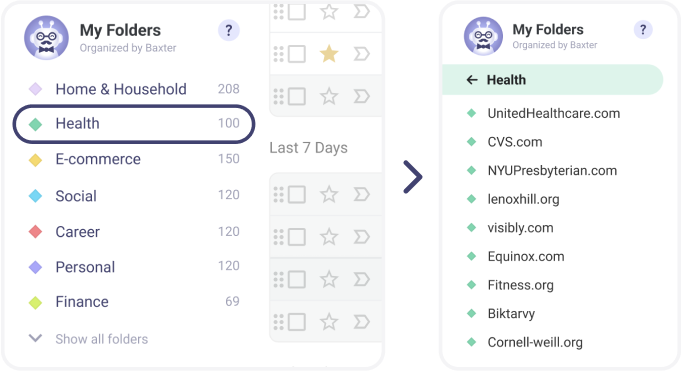
This one does everything Unsubscribe does, then adds a full inbox-organization toolkit: the Senders view, automatic labels and color folders, Auto-Clean rules, and the web dashboard. If you want an inbox that stays organized on its own, this is the one to pick.
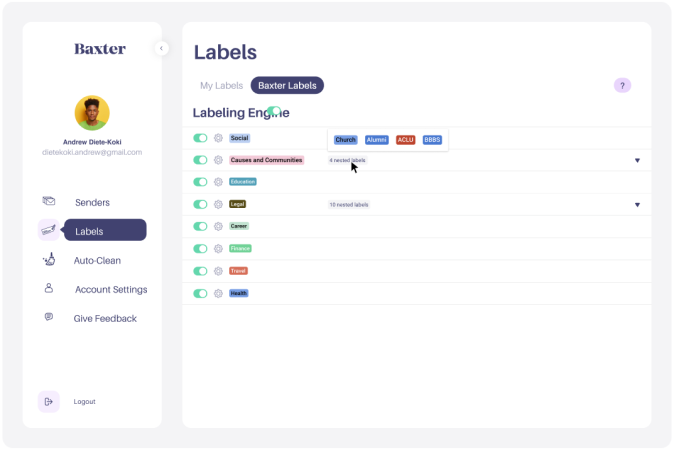
Organizer & Unsubscribe adds automatic labels, folders, and Auto-Clean.
Why two extensions?
Not everyone wants the full toolkit. Some people only want to unsubscribe and would rather not add anything else to Gmail; others want to reorganize their entire inbox. Two focused extensions keep each experience simple instead of bolting everything onto one.
What's in each
| Feature | Unsubscribe | Organizer & Unsubscribe |
|---|---|---|
| One-click & bulk unsubscribe | ✓ | ✓ |
| Monthly unsubscribe limit | 5 / month | Unlimited |
| Works right inside Gmail | ✓ | ✓ |
| Free to install | ✓ | ✓ |
| Senders view — act on every sender | — | ✓ |
| Automatic labels & color folders | — | ✓ |
| Auto-Clean rules + history | — | ✓ |
| Ignore senders for 30 days | — | ✓ |
| Web dashboard | — | ✓ |
How to upgrade
Already using Baxter Unsubscribe and want the full experience? Install Baxter Organizer & Unsubscribe from the Chrome Web Store and connect your Gmail — your unsubscribe workflow carries straight over, and you unlock organization, labels, and Auto-Clean. The two extensions don't conflict, so you can keep both or remove the unsubscribe-only one.
Which is better for you?
If you only unsubscribe now and then, Baxter Unsubscribe is perfect — it does one thing well, though its free plan caps you at 5 unsubscribes a month. If you have a big backlog to clear, or you want a genuinely organized inbox that stays clean without daily effort, go with Organizer & Unsubscribe — you get unlimited unsubscribes plus the full toolkit. Most people who start with Unsubscribe end up upgrading once they hit the limit or see how much further real organization takes them.